Wednesday, June 14, 2017

Bidirectional Searching Graph Algorithm

Bidirectional Search

We know our traditional searching algorithms to search for a goal vertex starting from a source
vertex  using BFS.In normal graph search using BFS/DFS we begin our search in one direction usually from source vertex toward the goal vertex, but what if we start search form both direction simultaneously.

So , Bidirectional search is a graph searching algorithm which find shortest path from source to goal vertex. It runs two simultaneous search that is.

1)Forward search form source/initial vertex toward goal vertex
2)Backward search form goal/target vertex toward source vertex

Bidirectional search replaces single search graph which is likely to grow exponentially with two smaller sub graphs – one starting from initial vertex and other starting from goal vertex. The search terminates when two graphs reach at same point or intersect each-other.

For Example:


Suppose we want to find if there exists a path from vertex 0 to vertex 14. Here we can execute two searches, one from vertex 0 and other from vertex 14. When both forward and backward search meet at vertex 7, we know that we have found a path from node 0 to 14 and search can be terminated now. We can clearly see that we have successfully avoided unnecessary exploration.


Now Question is why bidirectional approach?

Ans: Because

1)in many cases it is faster.

2)It dramatically reduce the amount of required exploration.

Let us suppose,

 if branching factor of tree is a and distance of goal vertex from source is d,
 then the normal BFS/DFS searching complexity would be O(a^d).

On the other hand, if we execute two search operation then the complexity would be O(a^{d/2})
for each search and total complexity would be O(a^{d/2}+a^{d/2}) which is far less than O(a^d).

When to use bidirectional approach?

1)Both initial and goal states are unique and completely defined.
The branching factor is exactly the same in both directions.

Performance measures

Completeness : Bidirectional search is complete if BFS is used in both searches.

Optimality : It is optimal if BFS is used for search and paths have uniform cost.
Time and Space Complexity : Time and space complexity is O(a^{d/2})

Sample Code:

public static class Node
{
    private final T data;
    private final Set<Node> adjacent = new HashSet<Node>();

    public Set<Node> getAdjacent() {
      return adjacent;
    }

    public Node(T data) {
      this.data = data;
    }

    public T getData() {
      return data;
    }

    // returns if the node was added, false if already there
    public boolean addAdjacent(Node node) {
      return adjacent.add(node);
    }

    // returns true if any were added
    public boolean addAdjacents(Set<Node> nodes) {
      return adjacent.addAll(nodes);
    }
}

public static boolean pathExistsBidirectional(Node a, Node b)
{
    // BFS on both nodes at the same time
    Queue<Node> queueA = new Queue<Node>();
    Queue<Node> queueB = new Queue<Node>();
    Set<Node> visitedA = new HashSet<Node>();
    Set<Node> visitedB = new HashSet<Node>();

    visitedA.add(a);
    visitedB.add(b);
    queueA.add(a);
    queueB.add(b);

    while (!queueA.isEmpty() && !queueB.isEmpty()) {
      if (pathExistsBidirectionalHelper(queueA, visitedA, visitedB)) {
        return true;
      }
      if (pathExistsBidirectionalHelper(queueB, visitedB, visitedA)) {
        return true;
      }
    }

    return false;
  }

  private static boolean pathExistsBidirectionalHelper(Queue<Node> queue, Set<Node> visitedFromThisSide, Set<Node> visitedFromThatSide) {
    if (!queue.isEmpty()) {
      Node next = queue.remove();
      for (Node adjacent : next.getAdjacent()) {
        if (visitedFromThatSide.contains(adjacent)) {
          return true;
        } else if (visitedFromThisSide.add(adjacent)) {
          queue.add(adjacent);
        }
      }
    }
    return false;
  }


Wednesday, June 7, 2017

Noble integers in an array or count of greater elements is equal to value java

Noble integers in an array or count of greater elements is equal to value?.

Explanation:

Given an array arr[], find a Noble integer in it. An integer x is said to be Noble in arr[] if the number of integers greater than x are equal to x. If there are many Noble integers, return any of them. If there is no, then return -1.

Examples:

Input  : [7, 3, 16, 10]
Output : 3
Number of integers greater than 3 is three.

Input  : [-1, -9, -2, -78, 0]
Output : 0
Number of integers greater than 0 is zero.

Solution:

There can be many approach to solve this problem.you can solve this problem by "Brute Force" approach and also by
"Sorting" .

Brute Force Approach:

First Step: Iterate through the array.
Second Step: For every element arr[i], find the number of elements greater than arr[i].

Sample Program:

/**
 *
 */

/**
 * @author Abhinaw.Tripathi
 *
 */
public class NobleIntegerApp
{

public static void main(String[] args)
{
int [] arr = {10, 3, 20, 40, 2};

        int res = nobleInteger(arr);
       
        if (res!=-1)
            System.out.println("The noble integer is "+ res);
        else
            System.out.println("No Noble Integer Found");
}

public static int nobleInteger(int arr[])
       {
        int size = arr.length;
        for (int i=0; i<size; i++ )
        {
            int count = 0;
            for (int j=0; j<size; j++)
                if (arr[i] < arr[j])
                    count++;
           
            if (count == arr[i])
                return arr[i];
        }
        return -1;
    }

}

 Output:The noble integer is 3

Complexity: Though this is not very good Solution as you can see there are two loops and comparison happening.

Sorting Approach:

Step one: Sort the array in ascending order.complexity O(nlogn).
Step two:Iterate through the array.
Step three: Compare the value of index i to the number of elements after index i.
           If arr[i] equals the number of elements after arr[i], it is a noble Integer.

Step four:Check condition, (A[i] == length-i-1). the complexity in doing this would be O(n).

Sample Code:

/**
 *
 */

/**
 * @author Abhinaw.Tripathi
 *
 */
public class NobleIntegerApp
{

public static void main(String[] args)
{
int [] arr = {10, 3, 20, 40, 2};

        int res = nobleInteger(arr);
       
        if (res!=-1)
            System.out.println("The noble integer is "+ res);
        else
            System.out.println("No Noble Integer Found");
}

public static int nobleInteger(int arr[])
      {
 Arrays.sort(arr);
       int n = arr.length;
       for (int i=0; i<n-1; i++)
       {
           if (arr[i] == arr[i+1])
               continue;

           if (arr[i] == n-i-1)
               return arr[i];
       }

       if (arr[n-1] == 0)
           return arr[n-1];

       return -1;
    }

}


Output: The noble integer is 3


Tuesday, May 30, 2017

Java Memory Architecture and Garbage Collection Algorithms(Part 2)

Java Memory Model

The Java memory model specifies how the Java virtual machine works with the computer's memory (RAM). The Java virtual machine is a model of a whole computer so this model naturally includes a memory model - AKA the Java memory model.

It is very important to understand the Java memory model if you want to design correctly behaving concurrent programs. The Java memory model specifies how and when different threads can see values written to shared variables by other threads, and how to synchronize access to shared variables when necessary.

The original Java memory model was insufficient, so the Java memory model was revised in Java 1.5. This version of the Java memory model is still in use in Java 8.


The Architecture of the Java Virtual Machine

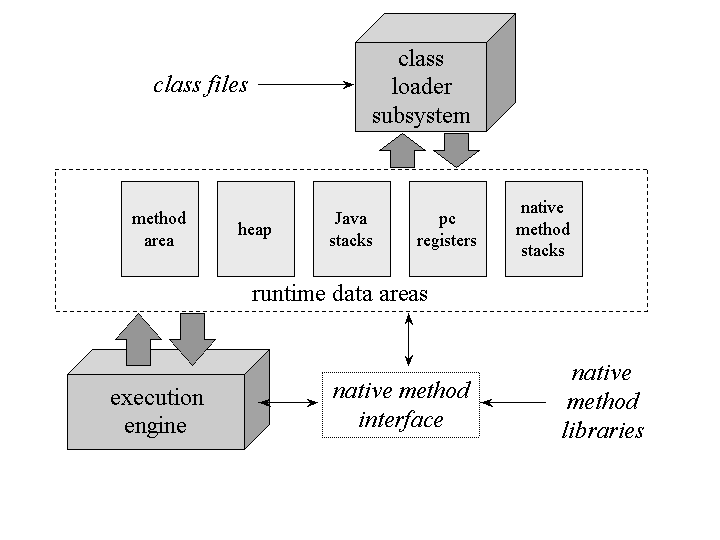
In the Java virtual machine specification, the behavior of a virtual machine instance is described in terms of subsystems, memory areas, data types, and instructions. These components describe an abstract inner architecture for the abstract Java virtual machine. The purpose of these components is not so much to dictate an inner architecture for implementations. It is more to provide a way to strictly define the external behavior of implementations. The specification defines the required behavior of any Java virtual machine implementation in terms of these abstract components and their interactions.

Figure shows a block diagram of the Java virtual machine that includes the major subsystems and memory areas described in the specification. As mentioned in previous chapters, each Java virtual machine has a class loader subsystem: a mechanism for loading types (classes and interfaces) given fully qualified names. Each Java virtual machine also has an execution engine: a mechanism responsible for executing the instructions contained in the methods of loaded classes.

When a Java virtual machine runs a program, it needs memory to store many things, including bytecodes and other information it extracts from loaded class files, objects the program instantiates, parameters to methods, return values, local variables, and intermediate results of computations. The Java virtual machine organizes the memory it needs to execute a program into several runtime data areas.

Although the same runtime data areas exist in some form in every Java virtual machine implementation, their specification is quite abstract. Many decisions about the structural details of the runtime data areas are left to the designers of individual implementations.

Different implementations of the virtual machine can have very different memory constraints. Some implementations may have a lot of memory in which to work, others may have very little. Some implementations may be able to take advantage of virtual memory, others may not. The abstract nature of the specification of the runtime data areas helps make it easier to implement the Java virtual machine on a wide variety of computers and devices.

Some runtime data areas are shared among all of an application's threads and others are unique to individual threads. Each instance of the Java virtual machine has one method area and one heap. These areas are shared by all threads running inside the virtual machine. When the virtual machine loads a class file, it parses information about a type from the binary data contained in the class file. It places this type information into the method area. As the program runs, the virtual machine places all objects the program instantiates onto the heap. See Figure 5-2 for a graphical depiction of these memory areas.


As each new thread comes into existence, it gets its own pc register (program counter) and Java stack. If the thread is executing a Java method (not a native method), the value of the pc register indicates the next instruction to execute. A thread's Java stack stores the state of Java (not native) method invocations for the thread. The state of a Java method invocation includes its local variables, the parameters with which it was invoked, its return value (if any), and intermediate calculations. The state of native method invocations is stored in an implementation-dependent way in native method stacks, as well as possibly in registers or other implementation-dependent memory areas.

The Java stack is composed of stack frames (or frames). A stack frame contains the state of one Java method invocation. When a thread invokes a method, the Java virtual machine pushes a new frame onto that thread's Java stack. When the method completes, the virtual machine pops and discards the frame for that method.

The Java virtual machine has no registers to hold intermediate data values. The instruction set uses the Java stack for storage of intermediate data values. This approach was taken by Java's designers to keep the Java virtual machine's instruction set compact and to facilitate implementation on architectures with few or irregular general purpose registers. In addition, the stack-based architecture of the Java virtual machine's instruction set facilitates the code optimization work done by just-in-time and dynamic compilers that operate at run-time in some virtual machine implementations.

See Figure for a graphical depiction of the memory areas the Java virtual machine creates for each thread. These areas are private to the owning thread. No thread can access the pc register or Java stack of another thread.


Java Memory Architecture and Garbage Collection Algorithms(Part 1)

Java Memory Architecture and Garbage Collection Algorithms Peeling Concept

Understand the Java Memory Model for the heap, as well as garbage collection algorithms, and memory leak best practices all with diagrams and bite-sized descriptions.


The diagram below is the Java Memory Model for the Heap as well as the PermGen for any Java Application running in the Java Virtual Machine (JVM). The ratios are also provided to get a fair understanding of how the distribution of allowed memory is done across each of the generation types. All of the info is completely applicable up to Java 1.7 (inclusive). This diagram is also known as the 'Managed Area' of the memory model.


Java Memory Architecture (Java Memory Model)


In addition to the above, there is a Stack Area, which can be configured using the -Xss option. This area holds the references on the heap, native references, pc registers, code cache, and local variables for all threads. This is also known as the 'Native Area' of the memory model.


Managed Area of the Java Memory Model (Java Memory Architecture)

[Young Generation/Nursery] Eden Space

All new objects are first created in the Eden Space. As soon as it reaches an arbitrary threshold decided by the JVM, a minor garbage collection (Minor GC) kicks in. It first removes all the non-referenced objects and moves referenced objects from the 'eden' and 'from' into the 'to' survivor space. Once the GC is over, the 'from' and 'to' roles (names) are swapped.

[Young Generation/Nursery] Survivor 1 (From)

This is a part of the survivor space (You may think of this a role in the survivor space). This was the 'to' role during the previous garbage collection (GC).

[Young Generation/Nursery] Suvrivor 2 (To)

This is also a part of the survivor space (You may think of this as a role in the survivor space too). It is here, during the GC, that all the referenced objects are moved to, from 'from' and 'eden'.

[Old Generation] Tenured

Depending on the threshold limits, which can be checked by using -XX:+PrintTenuringDistribution, which shows the objects (space in bytes) by age, objects are moved from the 'to' Survivor space to the Tenured space. 'Age' is the number of times that it has moved within the survivor space.

There are other important flags like, -XX:InitialTenuringThreshold, -XX:MaxTenuringThreshold and -XX:TargetSurvivorRatio which lead to an optimum utilization of the tenured as well as the survivor spaces.

By setting -XX:InitialTenuringThreshold and -XX:MaxTenuringThreshold we allow an initial value and a maximum value for 'Age' while maintaining the percentage utilization in the 'Survivor (To)' as specified by the -XX:+NeverTenure and -XX:+AlwaysTenure, which encouraged never to be used to tenure an object (risky to use). The opposite usage is to always tenure, which means to always use the 'old generation'.

The garbage collection that happens here is the major garbage collection (Major GC). This is usually triggered when the heap is full or the old generation is full. This is usually a 'Stop-the-World' event or thread that takes over to perform the garbage collection. There is another type of GC named full garbage collection (Full GC) which involves other memory areas such as the permgen space.

Other important and interesting flags related to the overall heap are -XX:SurvivorRatio and -XX:NewRatio, which specify the eden space to the survivor space ratio and old generation to the new generation ratio.

[Permanent Generation] Permgen space

The 'Permgen' is used to store the following information: Constant Pool (Memory Pool), Field & Method Data and Code. Each of them related to the same specifics as their name suggests.

Garbage Collection Algorithms

Serial GC (-XX:UseSerialGC): GC on Young Generation and Old Generation

Use the simple mark-sweep-compact cycle for young and tenured generations. This is good for client systems and systems with low memory footprint and smaller CPU.

Parallel GC (-XX:UseParallelGC): GC on Young Generation and Old Generation

This uses N threads, which can be configured using -XX:ParallelGCThreads=N, here N is also the number of CPU cores for garbage collection. It uses these N threads for GC in the Young Generation but uses only one-thread in the Old Generation.

Parallel Old GC (-XX:UseParallelOldGC): GC on Young Generation and Old Generation

This is same as the Parallel GC, except that it uses N threads for GC in both Old and Young Generation.

Concurrent Mark and Sweep GC (-XX:ConcMarkSweepGC): GC on Old Generation

As the name suggests, the CMS GC minimizes the pauses that are required for GC. It is most useful when used to create highly responsive applications and it does GC only in the Old Generation. It creates multiple threads for GC that work concurrently with applications threads, which can be specified using the -XX:ParallelCMSThreads=n.

G1 GC (-XX:UseG1GC): GC on Young and Old Generation (By Dividing Heap into Equal Size Regions)

This is a parallel, concurrent, and incrementally compacting low-pause garbage collector. G1 was introduced in Java 7 with the ultimate vision to replace CMS GC. It divides the heap into multiple, equal sized regions and then performs GC, usually starting with the region that has less live data, hence "Garbage First".

Most Common Out of Memory Issues

The most common out of memory issues, which all Java developers should know, are as follows:

Exception in thread "main": java.lang.OutOfMemoryError:

Java heap space. This does not necessarily imply a memory leak — as it could be due to lesser space configured for the heap. Otherwise, in a long-lived application it could be due to an unintentional reference being mentioned to heap objects (memory leak). Even the APIs that are called by the application could be holding references to objects that are unwarranted. Also, in applications that make excessive use of finalizers, sometimes the objects are queued into a finalization queue. When such an application creates higher priority threads and that leads to more and more objects in the finalization queue, it can cause an Out-of-Memory.

Exception in thread "main": java.lang.OutOfMemoryError:

PermGen space. If there are many classes and methods loaded or if there are many string literals created, especially through the use of intern() (From JDK 7 on, interned strings are no longer part of the PermGen), then this type of error occurs. When this kind of error occurs, the text ClassLoader.defineClass might appear near the top of the stack trace that is printed.

Exception in thread "main": java.lang.OutOfMemoryError: 

Requested array size exceeds VM limit. This again happens when the requested array size is greater than the available heap size. It may usually occur due to programmatic errors during runtime if an incredibly large value is requested for an array size.

Exception in thread "main": java.lang.OutOfMemoryError: 

request <s> bytes for <r>. Out of swap space? It is often the root cause of a memory leak. It happens when either the Operating System does not have sufficient swap space or when Another Process hogs all the available memory resources on the system. In simple terms, it was unable to provide the request space from heap due to exhaustion of space. The message indicates the size 's' (in bytes) of the request that failed and the reason 'r' for the memory request. In most cases the <r> part of the message is the name of a source module reporting the allocation failure, although in some cases it indicates a reason.

Exception in thread "main": java.lang.OutOfMemoryError:<reason> <stack trace> (Native method). This indicates that a Native method has met with an allocation failure. The root cause was that the error occurred in JNI rather than in the code executing inside the JVM. When the native code does not check for memory allocation errors, then the application crashes instead of going out of memory.

Definition of Memory Leak 

Think of memory leakage as a disease and the OutOfMemoryError as a symptom. But not all OutOfMemoryErrors imply memory leaks, and not all memory leaks manifest themselves as OutOfMemoryErrors.

In Computer Science, a memory leak is a type of resource leak that occurs when a computer program incorrectly manages memory allocations in such a way that memory, which is no longer needed, is not released. In Object-Oriented Programming, a memory leak may happen when an object is stored in memory but cannot be accessed by the running code.

Common Definitions of Memory Leak in Java

A memory leak occurs when object references that are no longer needed are unnecessarily maintained.

Memory leak in Java is a situation where some objects are not used by application any more, but GC fails to recognize them as unused.

A Memory Leak appears when an object is no longer used in the program but is still referenced somewhere at a location that is not reachable. Thus, the garbage collector cannot delete it. The memory space used for this object will not be released and the total memory used for the program will grow. This will degrade performances over time and the JVM may run out of memory.

In a way, Memory Leak would occur when No Memory can be Allocated on the Tenured Space.Some of the most common causes of Memory Leaks are:

  • ThreadLocal Variables
  • Circular and Complex Bi-Directional References
  • JNI Memory Leaks
  • Static Fields that are Mutable (Most Common)

I recommend the usage of Visual VM bundled with the JDK to start debugging your memory leak issues.

Common Debugging of Memory Leaks

  • NetBeans Profiler
  • Using the jhat Utility
  • Creating a Heap Dump
  • Obtaining a Heap Histogram on a Running Process
  • Obtaining a Heap Histogram at OutOfMemoryError
  • Monitoring the Number of Objects Pending Finalization
  • Third Party Memory Debuggers


The common strategies or steps for going about debugging memory leak issues include:


  • Identify Symptoms
  • Enable Verbose Garbage Collection
  • Enable Profiling
  • Analyze the Trace


Now let me simplify all the information that i have shared.continuing on Java Memory......


Friday, May 19, 2017

CountDownLatch in java example

CountDownLatch in Java:

It is used to make sure that a task waits for other threads before it starts. To understand its application, let us consider a server where the main task can only start when all the required services have started.

Working of CountDownLatch:

When we create an object of CountDownLatch, we specify the number if threads it should wait for, all such thread are required to do count down by calling CountDownLatch.countDown() once they are completed or ready to the job. As soon as count reaches zero, the waiting task starts running.

Sample Code:

import java.util.concurrent.CountDownLatch;

/**
 *
 */

/**
 * @author Abhinaw.Tripathi
 *
 */
public class CountDownLatchApp
{
/**
* @param args
* @throws InterruptedException
*/
public static void main(String[] args) throws InterruptedException
{
// TODO Auto-generated method stub

CountDownLatch latch=new CountDownLatch(7);
Worker worker1=new Worker(1000, latch, "Worker-1");
Worker worker2=new Worker(1000, latch, "Worker-2");
Worker worker3=new Worker(1000, latch, "Worker-3");
Worker worker4=new Worker(1000, latch, "Worker-4");
Worker worker5=new Worker(1000, latch, "Worker-5");
Worker worker6=new Worker(1000, latch, "Worker-6");
Worker worker7=new Worker(1000, latch, "Worker-7");

worker1.start();
worker2.start();
worker3.start();
worker4.start();
worker5.start();
worker6.start();
worker7.start();

latch.await();
System.out.println(Thread.currentThread().getName() + "has finished.");

}
}

class Worker extends Thread
{
private int delay;
private CountDownLatch countDownLatch;

public Worker(int delay,CountDownLatch countDownLatch,String name)
{
super(name);

this.countDownLatch=countDownLatch;
this.delay=delay;
}

public void run()
{
try
{
Thread.sleep(delay);
countDownLatch.countDown();
System.out.println(Thread.currentThread().getName() + "Finished");
}
catch(Exception e)
{
e.printStackTrace();
}
}

}

Output:

Worker-1Finished
Worker-3Finished
Worker-7Finished
Worker-4Finished
Worker-5Finished
Worker-6Finished
Worker-2Finished
mainhas finished.


Important Points about CountDownLatch:

Creating an object of CountDownLatch by passing an int to its constructor (the count), is actually number of invited parties (threads) for an event.

The thread, which is dependent on other threads to start processing, waits on until every other thread has called count down. All threads, which are waiting on await() proceed together once count down reaches to zero.

countDown() method decrements the count and await() method blocks until count == 0

Thursday, May 18, 2017

Garbage Collection in Java

All about Garbage Collection in Java/Android.


In other programming language, it is programmer’s responsibility to delete a dynamically allocated object if it is no longer in use.

In Java, the programmer need not to care for all those objects which are no longer in use. Garbage collector destroys these objects, but the garbage collector is not guaranteed to run at any specific time, it can be at any time once an object is eligible for garbage collection.


Following are some important points related to garbage collection:

The finalize () method:

Called by the garbage collector on an object when garbage collector determines that there are no more references to the object.

The finalize method is never invoked more than once by a Java virtual machine for any given object.
Our program must not rely on the finalize method because we never know if finalize will be executed or not.

Ways to make an object eligible for garbage collection:

Once the object is no longer used by the program, we can change the reference variable to a null, thus making the object which was referred by this variable eligible for garbage collection.
Please note that the object can not become a candidate for garbage collection until all references to it are discarded.

class Test
{
    public static void main(String[] args)
    {
        Test obj = new Test();

        /* obj being used for some purpose in program */

        /* When there is no more use of o1, make the object
           referred by o1 eligible for garbage collection */      
        obj = null;

        /* Rest of the program */
     }
}


gc() – request to JVM:

We can request to run the garbage collector using java.lang.System.gc() but it does not force garbage collection, the JVM will run garbage collection only when it wants to run it.

We may use system.gc() or runtime.gc()

import java.lang.*;
public class Test
{
    public static void main(String[] args)
    {
        int g1[] = { 0, 1, 2, 3, 4, 5 };
        System.out.println(g1[1] + " ");

        // Requesting Garbage Collector
        System.gc();
        System.out.println("Hey I just requested "+
                          "for Garbage Collection");
    }
}


I have a question?

What happens when group of object only refer to each other?

Ans: It is possible that a set of unused objects only refer to each other.For example, object o1 refers to object o2. Object o2 refers to o1. None of them is referenced by any other object. In this case both the objects o1 and o2 are eligible for garbage collection.All this process is called Island of Isolation.

eg: public class Test
{
    Test geek;
    public static void main(String [] args)
    {
        Test o1 = new Test();
        Test o2 = new Test();
        o1.geek = o2;
        o2.geek = o1;

        o1 = null;
        o2 = null;
       // both become eligible for garbage collection
    }
}

Tuesday, May 16, 2017

Collections.reverseOrder() in Java with Examples

Collections.reverseOrder() in Java with Examples

java.util.Collections.reverseOrder() method is a java.util.Collections class method.

// Returns a comparator that imposes the reverse of
// the natural ordering on a collection of objects
// that implement the Comparable interface.
// The natural ordering is the ordering imposed by
// the objects' own compareTo method

public static  Comparator reverseOrder()

We can the comparator returned by Collections.reverseOrder() to sort a list in descending order.

Sample Code:

import java.util.ArrayList;
import java.util.Collections;


/**
 * @author Abhinaw.Tripathi
 *
 */
public class ReverseOrderApp {

/**
* @param args
*/
public static void main(String[] args) {
// TODO Auto-generated method stub
ArrayList<Integer> al = new ArrayList<Integer>();
        al.add(30);
        al.add(20);
        al.add(10);
        al.add(40);
        al.add(50);

        /* Collections.sort method is sorting the
        elements of ArrayList in descending order. */
        Collections.sort(al, Collections.reverseOrder());

        // Let us print the sorted list
        System.out.println("List after the use of Collection.reverseOrder()"+
                           " and Collections.sort() :\n" + al);
}

}


Output:

List after the use of Collection.reverseOrder() and Collections.sort() :
[50, 40, 30, 20, 10]


We can use this method with Arrays.sort() also.

Sample Code:

import java.util.*;

public class Collectionsorting
{
    public static void main(String[] args)
    {
        // Create an array to be sorted in descending order.
        Integer [] arr = {30, 20, 40, 10};

        /* Collections.sort method is sorting the
        elements of arr[] in descending order. */
        Arrays.sort(arr, Collections.reverseOrder());

        // Let us print the sorted array
        System.out.println("Array after the use of Collection.reverseOrder()"+
                           " and Arrays.sort() :\n" + Arrays.toString(arr));
    }
}

Output:

Array after the use of Collection.reverseOrder() and Arrays.sort() :
[40, 30, 20, 10]


public static Comparator reverseOrder(Comparator c)


Sample Code:

It returns a Comparator that imposes reverse order of a passed Comparator object. We can use this method to sort a list in reverse order of user defined Comparator. For example, in the below program, we have created a reverse of user defined comparator to sort students in descending order of roll numbers.

// Java program to demonstrate working of
// reverseOrder(Comparator c) to sort students in descending
// order of roll numbers when there is a user defined comparator
// to do reverse.

import java.util.*;
import java.lang.*;
import java.io.*;

// A class to represent a student.
class Student
{
    int rollno;
    String name, address;

    // Constructor
    public Student(int rollno, String name,
                               String address)
    {
        this.rollno = rollno;
        this.name = name;
        this.address = address;
    }

    // Used to print student details in main()
    public String toString()
    {
        return this.rollno + " " + this.name +
                           " " + this.address;
    }
}

class Sortbyroll implements Comparator<Student>
{
    // Used for sorting in ascending order of
    // roll number
    public int compare(Student a, Student b)
    {
        return a.rollno - b.rollno;
    }
}

// Driver class
class Main
{
    public static void main (String[] args)
    {
        ArrayList<Student> ar = new ArrayList<Student>();
        ar.add(new Student(111, "bbbb", "london"));
        ar.add(new Student(131, "aaaa", "nyc"));
        ar.add(new Student(121, "cccc", "jaipur"));

        System.out.println("Unsorted");
        for (int i=0; i<ar.size(); i++)
            System.out.println(ar.get(i));

        // Sorting a list of students in descending order of
        // roll numbers using a Comparator that is reverse of
        // Sortbyroll()
        Comparator c = Collections.reverseOrder(new Sortbyroll());
        Collections.sort(ar, c);

        System.out.println("\nSorted by rollno");
        for (int i=0; i<ar.size(); i++)
            System.out.println(ar.get(i));
    }
}


Output :

Unsorted
111 bbbb london
131 aaaa nyc
121 cccc jaipur

Sorted by rollno
131 aaaa nyc
121 cccc jaipur
111 bbbb london

Collections.shuffle() in Java with Examples

Collections.shuffle() in Java with Examples

java.util.Collections.shuffle() is a java.util.Collections class method.

// Shuffles mylist

public static void shuffle(List mylist)

This method throws UnsupportedOperationException if the
given list or its list-iterator does not support
the set operation.

Sample Code:

import java.util.ArrayList;
import java.util.Collections;

/**
 *
 */

/**
 * @author Abhinaw.Tripathi
 *
 */
public class CollectionSuffleApp {

/**
* @param args
*/
public static void main(String[] args) {
// TODO Auto-generated method stub

ArrayList<String> mylist =new ArrayList<>();
mylist.add("code");
        mylist.add("quiz");
        mylist.add("geeksforgeeks");
        mylist.add("quiz");
        mylist.add("practice");
        mylist.add("qa");
        System.out.println("Original List : \n" + mylist);
        Collections.shuffle(mylist);
        System.out.println("\nShuffled List : \n" + mylist);
}

}


Output:

 Original List : 
[code, quiz, geeksforgeeks, quiz, practice, qa]

Shuffled List : 
[qa, practice, geeksforgeeks, quiz, code, quiz]


It shuffles a given list using the user provided source of randomness.

// mylist is the list to be shuffled.
// rndm is source of randomness to shuffle the list.

public static void shuffle(List mylist, Random rndm)

It throws  UnsupportedOperationException if the specified list or
its list-iterator does not support the set operation.


Key Points:

This method works by randomly permuting the list elements
Runs in linear time. If the provided list does not implement the RandomAccess interface, like LinkedList and is large, it first copies the list into an array, then shuffles the array copy, and finally copies array back into the list. This makes sure that the time remains linear.
It traverses the list backwards, from the last element up to the second, repeatedly swapping a randomly selected element into the “current position”. Elements are randomly selected from the portion of the list that runs from the first element to the current position, inclusive.